The localhost in your SSH tunnel isn't yours
The port that isn't there
My production Postgres runs in a container on a Hetzner box, right next to the app that uses it. It has never been reachable from the internet, and I would like to keep it that way. Here is most of the service definition that makes that true:
  postgres:
    image: postgres:17
    restart: unless-stopped
    environment:
      POSTGRES_USER: ${POSTGRES_USER}
      POSTGRES_PASSWORD: ${POSTGRES_PASSWORD}
    volumes:
      - pgdata:/var/lib/postgresql/data
    networks:
      - internal
What matters is what is missing. There is no ports: block. Not a narrowed one, not one bound to 127.0.0.1 — none at all. Docker publishes a container port to the host only when you ask it to, and I never ask.
You can see the difference in two lines of docker ps:
cvnext-postgres-1   5432/tcp
cvnext-traefik-1    0.0.0.0:80->80/tcp, 0.0.0.0:443->443/tcp
Those look alike and mean opposite things. 0.0.0.0:443->443/tcp is a published port: a real listening socket on the host, with a NAT rule behind it. A bare 5432/tcp is only the image's EXPOSE metadata — documentation that the process inside listens there. It binds nothing. The arrow is the entire difference.
One correction I had to make to my own mental model: my network is called internal, but that is just a name I picked. It is not Docker's internal: true, which removes the gateway and cuts outbound egress. Mine is an ordinary bridge with egress; the name only records an intention. The absent ports: block is what does the actual work.
Which leaves a practical problem. Sometimes I want to point DBeaver at that database.
The obvious command connects, then refuses every query
ssh -L 5438:localhost:5432 root@box
This connects. You get a shell, no errors, everything looks right. Then you point a client at 127.0.0.1:5438 and the ssh session starts printing:
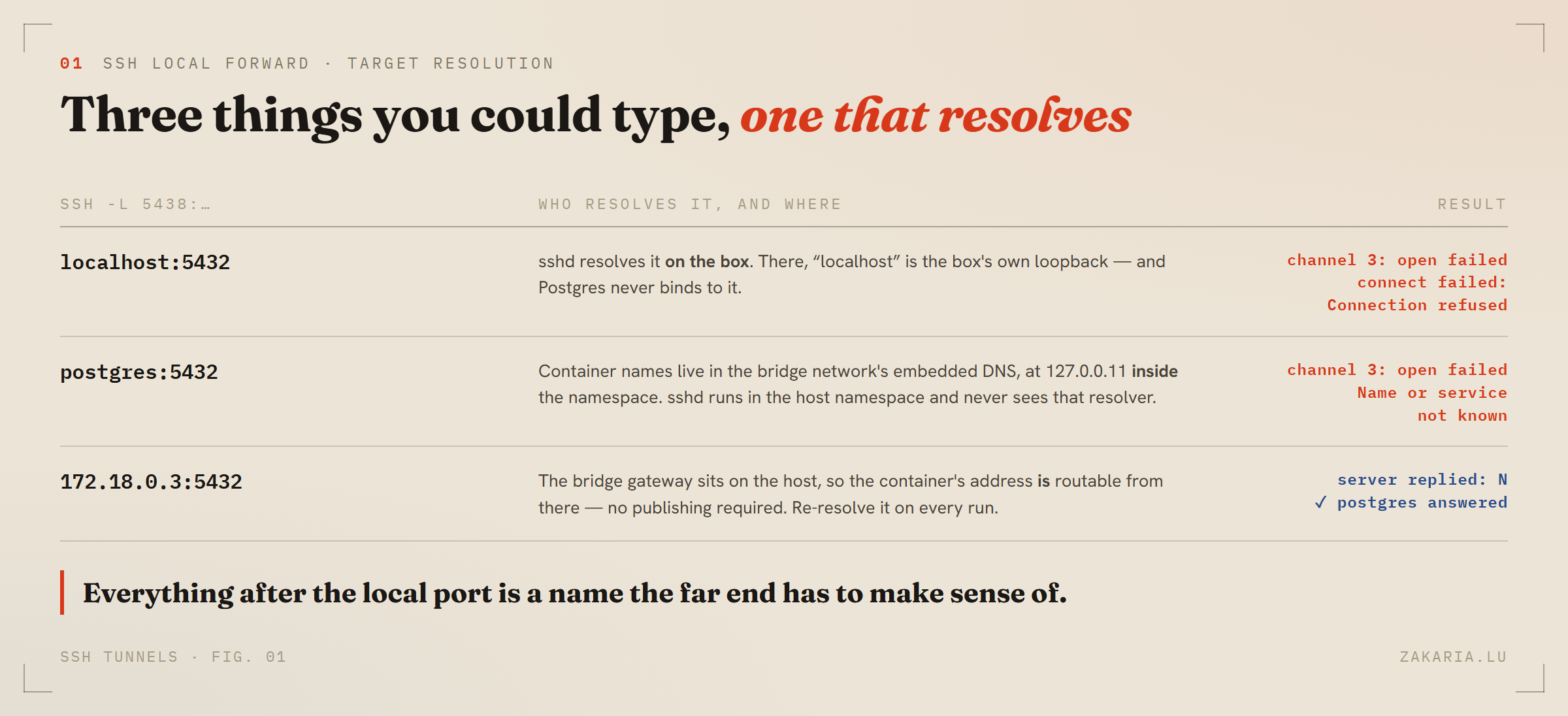
channel 3: open failed: connect failed: Connection refused
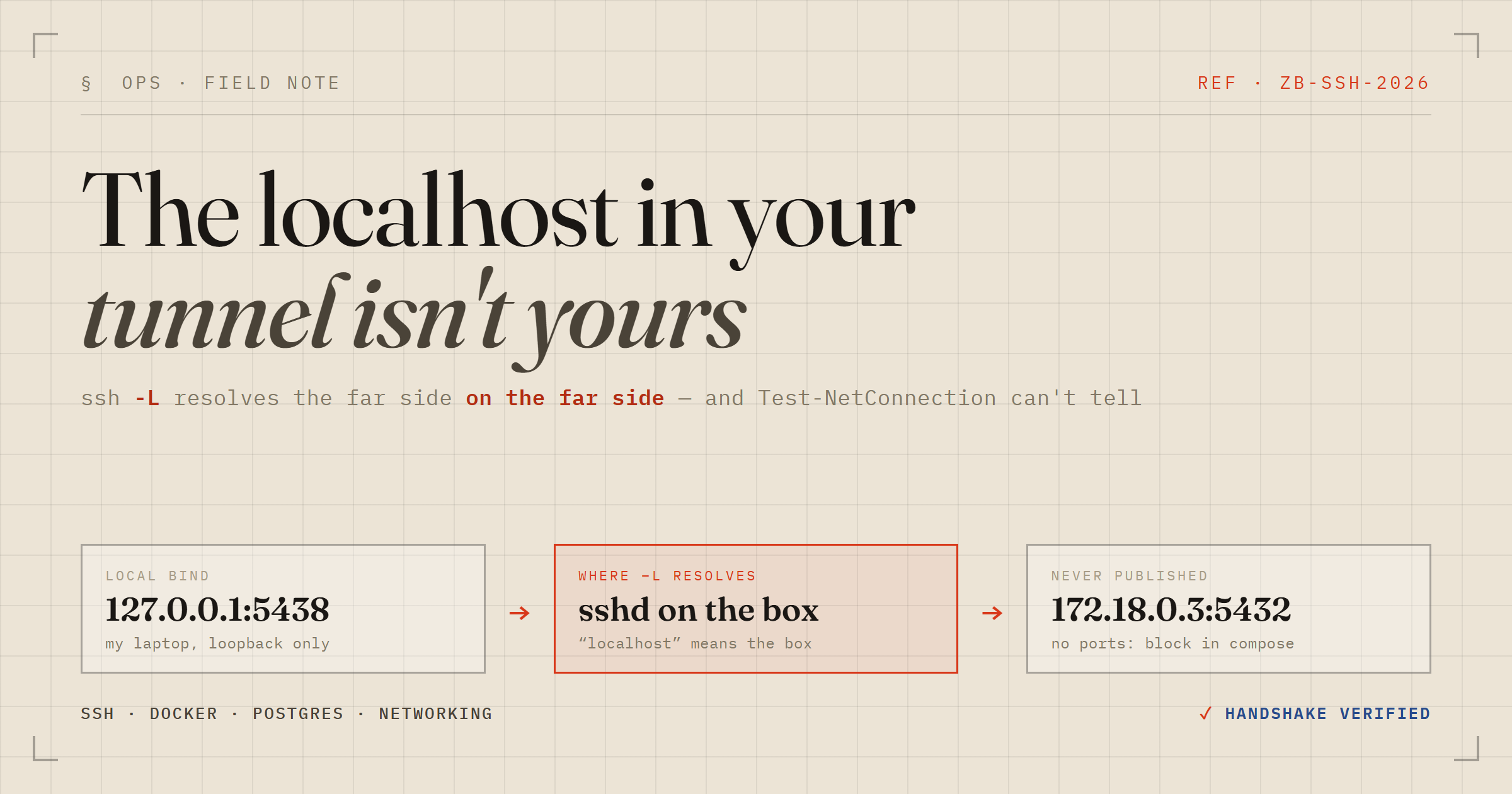
The reason is one sentence, and once you have read it you cannot unsee it: the host:port half of -L is resolved on the far side, by sshd.
So when I wrote localhost I was not naming my laptop. I was naming the box's own loopback interface — where Postgres never binds. I asked sshd to connect to a port on itself that nothing is listening on, and it told me so, politely, one channel at a time, long after the session had already looked healthy.
That delay is the real trap. SSH authenticates and opens the session up front, but a forwarded channel is only opened lazily, when something actually connects to the local port. A misaddressed -L therefore fails at query time rather than at connect time — so the error surfaces next to your database client and reads like a database problem.
Container names do not work either
The next instinct is to use the name from compose:
ssh -L 5438:postgres:5432 root@box
Also no. Docker's service discovery is a resolver at 127.0.0.11 that lives inside the containers' network namespace. sshd runs in the host namespace and has no idea that postgres is a name at all.
But the host is not helpless. The bridge Docker created for that network is a host interface, with the gateway address on the host side — that is how the containers reach the world in the first place. So the container's address on that bridge is routable from the host, published or not. That is the target that works.
Resolve the IP every single time
ssh root@box "docker inspect -f '{{.NetworkSettings.Networks.cvnext_internal.IPAddress}}' cvnext-postgres-1"
# 172.18.0.3
Never save that value. Docker allocates addresses from the bridge pool when a container is created, so any docker compose up -d that recreates Postgres — a version bump, an env change, an edited healthcheck — can move it. A cached IP is the most likely reason a tunnel that worked yesterday refuses connections today, and it is a mean one to debug, because a stale address fails in a way that looks exactly like the box being down.
That is precisely why I scripted the sequence instead of saving a known-good command in my notes. The IP is the one part that must never be remembered.
Five flags, and one that actually matters
ssh -N \
  -o BatchMode=yes \
  -o ExitOnForwardFailure=yes \
  -o ServerAliveInterval=30 -o ServerAliveCountMax=3 \
  -L 127.0.0.1:5438:172.18.0.3:5432 root@box
-N— forward only, run no remote command. Without it you have also backgrounded an idle login shell.BatchMode=yes— never prompt. A password prompt in a background process hangs forever, with nothing on screen to say why.ExitOnForwardFailure=yes— the important one. By default, if the local bind fails because the port is taken, ssh logs a line and stays up perfectly happily. You are then holding a tunnel that is not tunnelling. This flag makes a failed forward a failed connection.ServerAliveInterval/ServerAliveCountMax— a dropped link exits in about 90 seconds instead of black-holing every connection.- The
127.0.0.1:prefix on the local side — an explicit loopback bind. The entire point of this exercise is to not accidentally republish production Postgres to my own LAN.
Run it in the background and send stderr to a log file. Because of -N, a healthy tunnel writes absolutely nothing — so an empty log is the success signal, and that log is the only place forwarding errors will ever appear.
Test-NetConnection is not proof
This is the part I want to argue about, because I watched myself do the wrong thing for years.
The reflex check is Test-NetConnection 127.0.0.1 -Port 5438, or nc -z, same idea. I pointed one at a deliberately broken tunnel — right box, right flags, a target IP that does not exist — and it returned True.
Of course it did. It completed a TCP handshake with ssh, on my own laptop. The local listener accepts the connection first and only then tries to open a channel to the far end, so the failure happens strictly after your check has already succeeded. The test proves ssh bound the local port — which ExitOnForwardFailure already guaranteed — and it cannot see the far end at all. It is a confident assertion about the wrong machine.
Eight bytes that cannot lie
The honest check is to make the server speak. Postgres has exactly one message you can send before authenticating, with no client and no password: the SSLRequest.
$c = New-Object Net.Sockets.TcpClient('127.0.0.1', 5438)
$s = $c.GetStream()
$b = [byte[]](0,0,0,8,4,210,22,47)
$s.Write($b, 0, 8); $s.Flush()
Write-Output ('server replied: ' + [char]$s.ReadByte())
$c.Close()
Eight bytes: an Int32 length of 8, then the Int32 80877103 — which is (1234 << 16) | 5679, a value chosen precisely because no real protocol version will ever collide with it. The server replies with a single byte: S if it will speak TLS, N if it will not.
I get N, which is exactly right — the container speaks plaintext on a private bridge, so it declines. But the value is not the point. The point is that a Postgres answered. Not a proxy metric, not an inference from a bound socket: the process I was trying to reach sent me a byte.
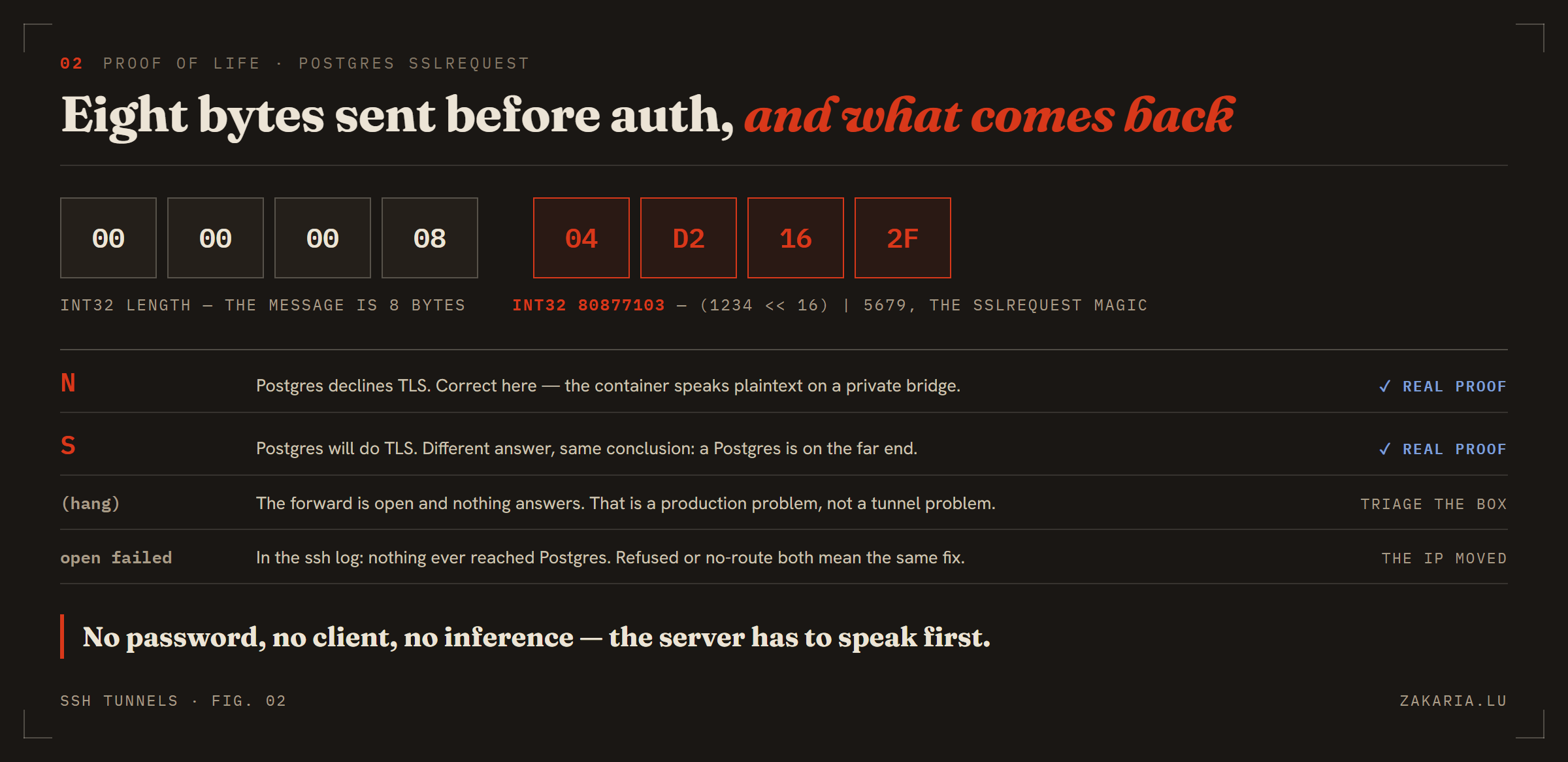
N and S are proof — a wrong answer would be no answer. The failure modes separate cleanly into “the tunnel is broken” and “production is broken”.And then, mostly, don't use it
The last twist is that for anything scripted this tunnel is the wrong tool, because going through it means putting the production password somewhere to authenticate with. The container's local socket trusts connections, so a read needs no password at all:
ssh root@box "docker exec cvnext-postgres-1 psql -U cvnext -d cvnext \
  -tAc 'select count(*) from focus.focus_task'"
Schema-qualify everything, by the way. psql invoked like this has a bare default search_path, so an unqualified table name errors with relation does not exist — which reads like missing data rather than a missing prefix, and sends you looking for the wrong bug.
The tunnel exists for the case that genuinely needs it: a human at a GUI client, where a password manager holds the credential and it never passes through a terminal, a script, or a chat window.
What I like about the arrangement is the shape of it. The box publishes 80 and 443, plus sshd on 22 — and the tunnel adds nothing to that list, because it is not a service. It is a channel inside a connection I already had, authenticated by a key I already hold. Postgres has no idea any of it is happening, which is the correct amount for Postgres to know.