CKA from zero, part 1: building the lab and learning why pods come back
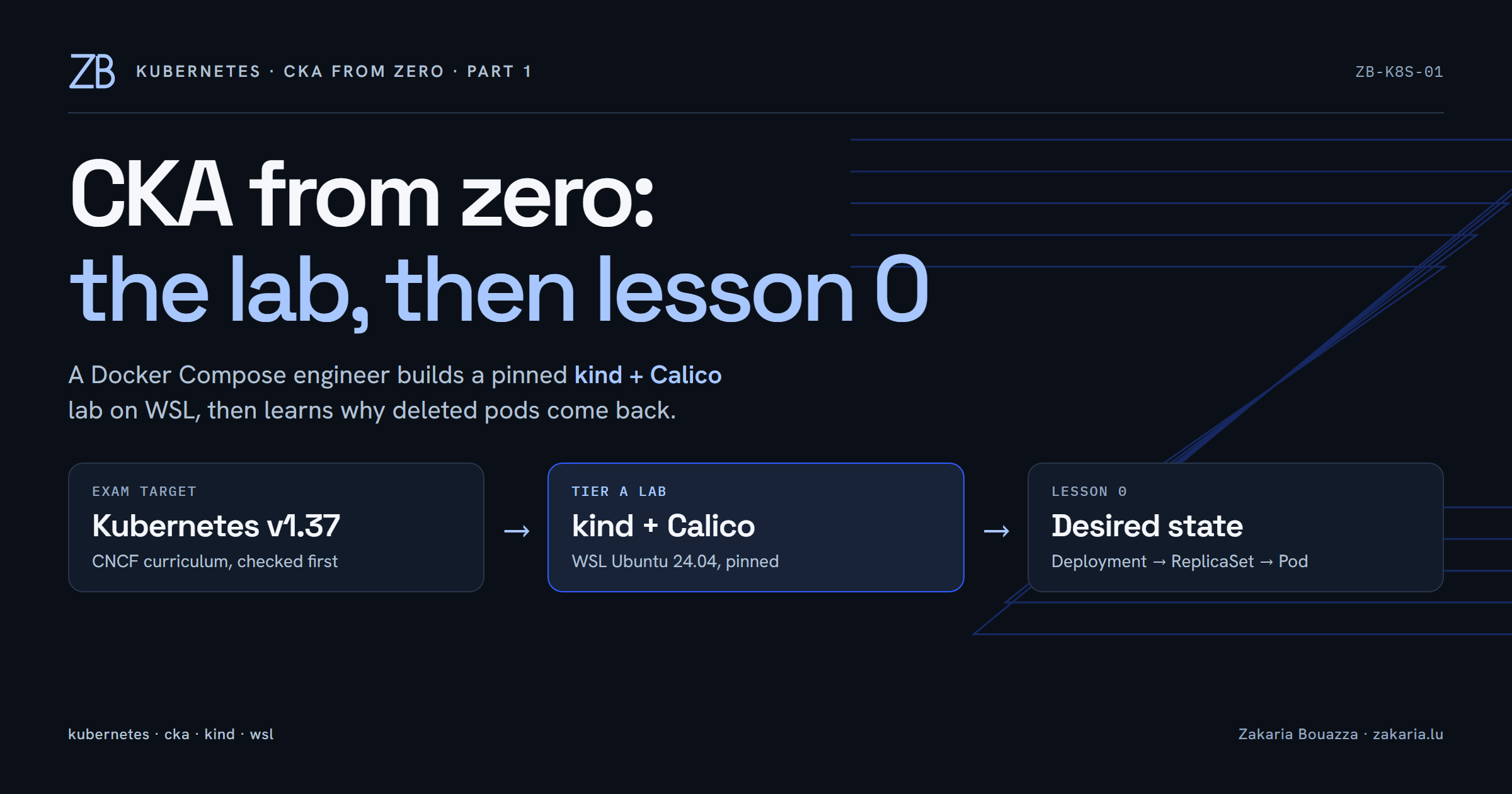
I know Docker Compose, Traefik, Postgres and Linux servers well. Until this week I had never run a single kubectl command. I have now started preparing for the Certified Kubernetes Administrator (CKA) exam, with the CKAD to follow, and I want to do it the way I learn best: hands on a real cluster, with a written record of what broke.
This first part covers the lab I built and my first lesson. Everything is in a public repository: github.com/zakariahere/cka-lab.
First, check what the exam actually runs
The exam is a performance-based test: two hours, tasks in a real terminal, and 66% to pass. Before choosing any version I checked two sources. The Linux Foundation exam page says the CKA is based on Kubernetes v1.37, and the cncf/curriculum repository has CKA_Curriculum_v1.37.pdf. The exam page still links an overview PDF labelled v1.35, so the curriculum repository is the one I trust. The environment moves to a new minor release four to eight weeks after it ships, so I will check again before the exam.
The weights shaped the whole plan: Troubleshooting 30%, Cluster Architecture, Installation and Configuration 25%, Services and Networking 20%, Workloads and Scheduling 15%, Storage 10%. Almost a third of the score is fixing broken clusters, so the lab must be easy to break and cheap to rebuild.
Two tiers, two different jobs
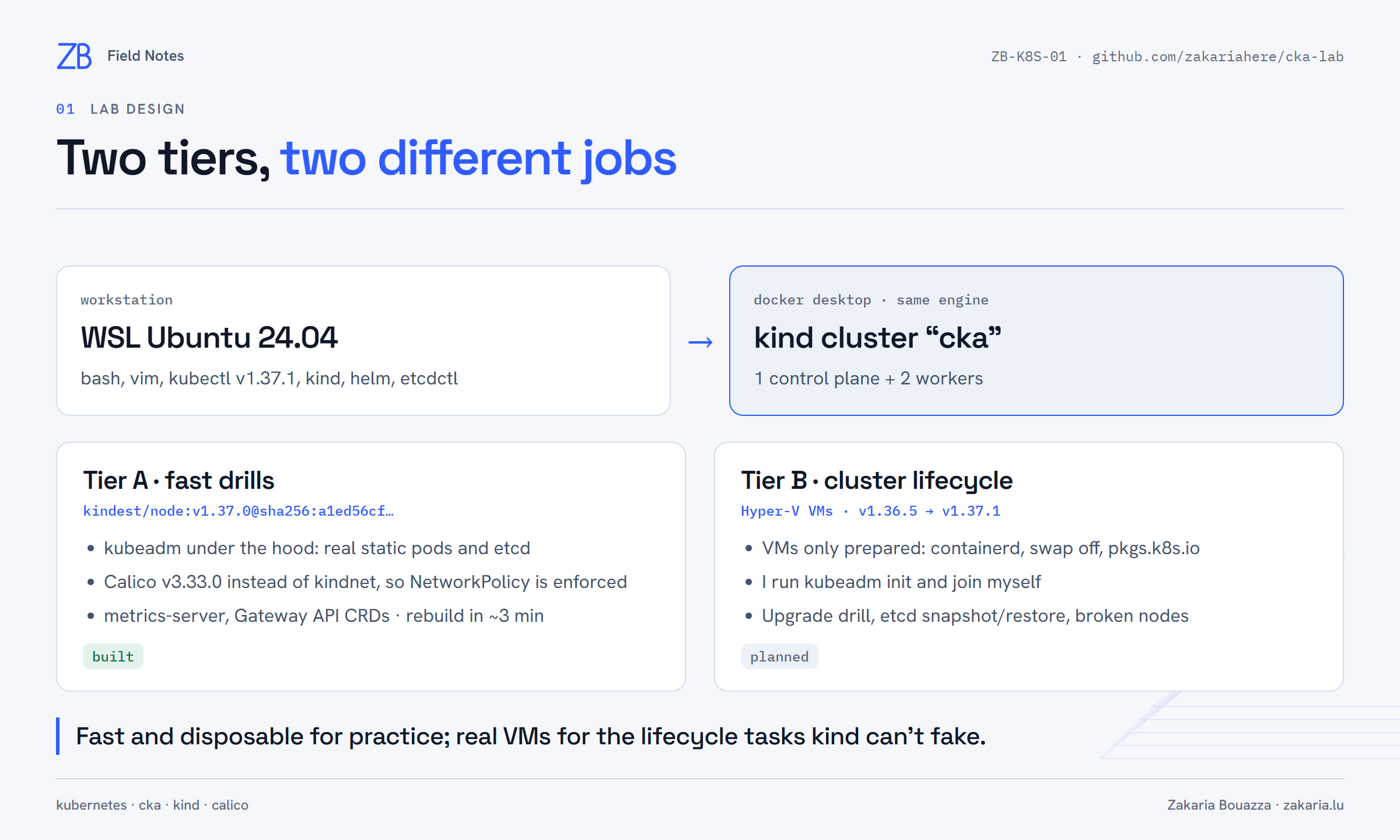
Tier A is for daily practice; Tier B is for the lifecycle tasks that a container-based cluster cannot fake.
Tier A is a kind cluster with one control plane and two workers. kind runs each node as a container, but it bootstraps them with kubeadm, so the control plane really is a set of static pods with a real etcd. That matters for troubleshooting practice later.
kind's default network plugin, kindnet, does not enforce NetworkPolicy. A policy you write is accepted and then ignored, which is a bad way to learn a 20% domain. So I turned it off with disableDefaultCNI: true and installed Calico v3.33.0 instead, plus metrics-server (for kubectl top and autoscaling) and the Gateway API CRDs.
Tier B is not built yet. It will be three Ubuntu VMs on Hyper-V, prepared only for kubeadm (containerd, swap off, the pkgs.k8s.io repository). I will run kubeadm init and join myself, on v1.36.5, so that upgrading to v1.37.1 is a real drill. One warning I wrote down in advance: the Hyper-V Default Switch can hand out a new subnet after a host reboot, which breaks a cluster whose API server certificate is bound to the old IP. The plan is a dedicated internal switch with static addresses.
Bash, not PowerShell
My machine runs Windows 11, but the exam terminal is bash and vim, and so are the servers I work with. Practising in PowerShell would mean learning everything twice. I installed Ubuntu 24.04 in WSL2, enabled Docker Desktop's WSL integration, and do all practice there. There is still only one Docker engine: a kind cluster created from Ubuntu is the same one Windows sees.
The shell presets exactly what the exam presets: the k alias for kubectl and its completion. The two variables everyone recommends are deliberately missing, because typing them in the first minute is the habit:
export do="--dry-run=client -o yaml"
export now="--force --grace-period 0"
Pin everything, and wait two weeks
Every version lives in one file, versions.env, together with SHA-256 checksums from the official release pages. The kind node image is pinned by digest. I also set a rule: no release younger than two weeks. That rule skipped more than I expected. metrics-server v0.9.1 was two days old, so I took v0.9.0. Gateway API v1.7.0 was two days old, so I took v1.6.3. Calico v3.32.3 was three days old, so I took v3.33.0, which Calico tests against Kubernetes 1.35 to 1.37.
The install script downloads each binary into ~/.local/bin, verifies it with sha256sum -c, and skips anything already at the pinned version. Running it twice changes nothing. The same applies to the cluster script: lab a up on an existing cluster just re-applies the add-ons.
Four things that bit me
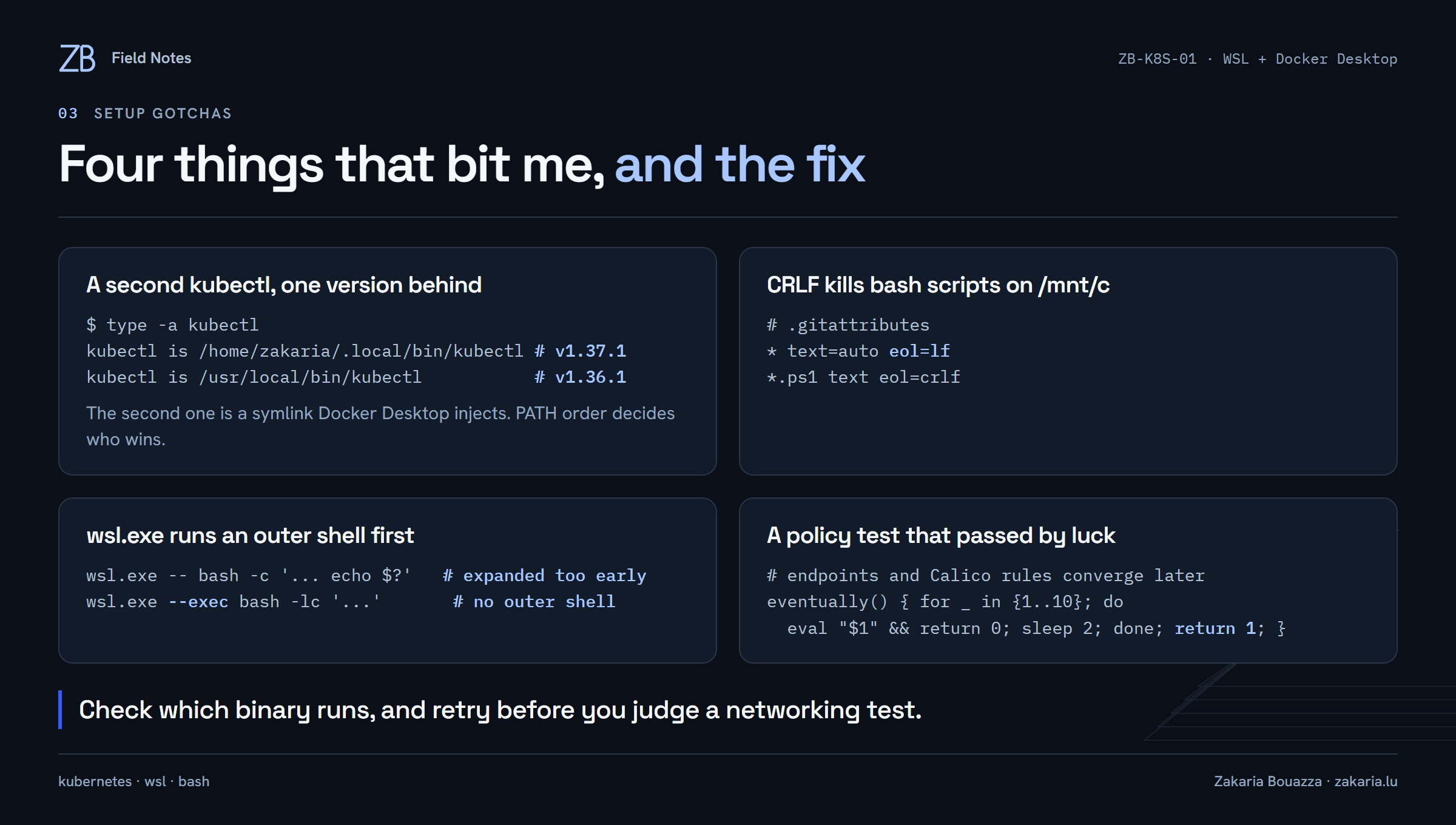
None of these were Kubernetes problems. All of them would have cost time in the exam or in production.
A second kubectl. Ubuntu already had
kubectlat/usr/local/bin: a symlink that Docker Desktop injects, at v1.36.1. My pinned v1.37.1 wins only because~/.local/bincomes first inPATH.type -a kubectlshows both.Line endings. The repository lives on the Windows drive and the scripts run from
/mnt/c. A CRLF file fails in bash, so.gitattributesforceseol=lf.wsl.exe has an outer shell.
wsl.exe -- bash -c '...'passes the command through another shell first, which expanded$?before my command ran. It made a failing test look like exit code 0.wsl.exe --execskips that shell.A test that passed by luck. My smoke test checks that traffic works, applies a deny-all NetworkPolicy, and checks that traffic stops. On the second run, the first probe failed: the new pod's endpoint was not ready yet. Kubernetes converges a few seconds after a change, so the probes now retry before they judge.
After those fixes, lab a verify passes six checks three runs in a row: DNS, traffic before the policy, NetworkPolicy enforcement, the metrics API, the Gateway API CRDs, and the etcd static pod.
Lesson 0: you declare the goal, Kubernetes keeps it true
With Compose, I run a command and something happens once. Kubernetes works differently: I store a goal in the cluster, such as three copies of nginx, and controllers compare that goal with reality, forever, and fix any difference. That is what "desired state" means, and it is the idea everything else builds on.
The experiment was short. I started a bare pod with k run hello --image=nginx:1.29-alpine and deleted it: it was gone for good. Then I created a Deployment with three replicas and deleted one of its pods: a new one appeared within seconds. The names explain why.
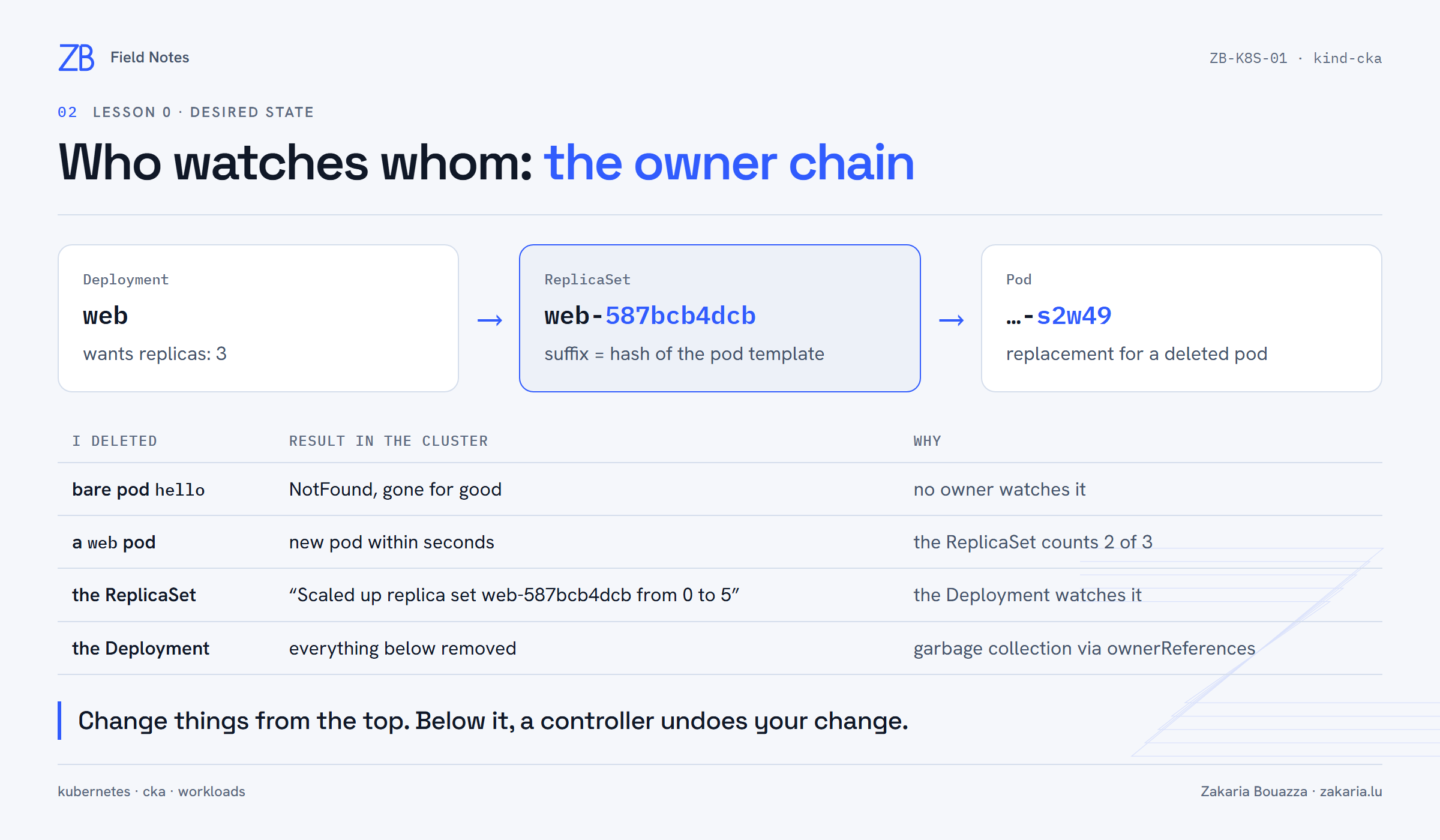
Each level is watched by the level above. Only the top of the chain stays deleted.
A Deployment does not manage pods directly. It owns a ReplicaSet, web-587bcb4dcb, and the ReplicaSet owns the pods. When I deleted the ReplicaSet itself, the event log showed the Deployment rebuilding it immediately:
Scaled up replica set web-587bcb4dcb from 0 to 5It came back with the same name, because the suffix is a hash of the pod template. Deleting the Deployment removed everything below it, through each object's ownerReferences. The practical rule: change things from the top. Below the top, a controller undoes your change.
A coach that grades the cluster, not me
I use Claude Code as a coach, configured by a CLAUDE.md in the repository. It has modes for short lessons, timed exam-style drills, fault injection, mock exams and reviews. Two rules matter most: it gives hints in steps instead of solutions, and it grades from kubectl output, not from what I say I did. When it checked lesson 0, it read the events and found the exact pod I had deleted.
It also got the level wrong at first. Its first lesson was about static pods and control-plane manifests, and I had to point out that I had never touched Kubernetes. We added a fifteen-lesson path from zero to the instructions, and every lesson now starts from a Compose concept I already know.
What comes next
Lesson 1 is YAML manifests: kubectl apply, generating files with $do, labels and namespaces. That is the closest thing to my compose.yaml habits. The next part of this series covers lessons 1 to 3: manifests, rolling updates and Services.